Wednesday, April 28, 2010

Applying iPad Technology IN THE KITCHEN

Over the weekend, I was taking a little timeout on Netflix to watch a delightfully bad scifi movie on the family iPad. I suddenly realized it was time to prepare that meal I had promised.

I wandered into the kitchen clutching the device under my arm and grasped that I was entering new iPad territory - literally! How does the iPad fit into the kitchen? "Good question!", I mused.
"And a good idea for a post!".

There were several issues to consider including: Why an iPad in the kitchen?

Well, I was not finished with my movie and it was time to prep then cook. I don't have any media in my kitchen and taking the iPad with me offered music, radio, television, movies and of course access to that online recipe I was going to use.

But an iPad in the kitchen? With water, grease spatters, and all manner of sticky organic material? Maybe not.

Just then, my wife wandered in and pointed out that we had the same problem with our beloved collection of cooking books. Why not use the same solution?

Of course! There are many cookbook stands that combine a nice adjustable angled stand with an acrylic cover to protect the book. This is a perfect solution for the iPad in the kitchen.

You can find these stands for as little as $20.00 at stores like Crate and Barrel, Bed Bath & Beyond, and of course Amazon. Just make sure it is adjustable and more important, that it has a splash guard. These are typically acrylic and the best ones are over sized for better protection. Ours was perfect.

Of course you can't use the iPad's surface without touching it. But again, this is the same for a recipe book. If you need to change the page (or the movie), wash those hands and raise that splash guard again when you are done.

I think the iPad would clean up easily from some errant spatters with its milled aluminum fitted back and glass front. It is probably reasonably kitchen safe anyway, but I'd hate to find a glob of sticky on it the next time I grabbed it.

So get yourself a cookbook stand and go iGourmet!

This is Theo APPLYING TECHNOLOGY in tasty new ways.

Ref: Google search for cookbook stand

Thursday, April 22, 2010

Applying "Lean Back" computing with the iPad

The idea of "lean forward" and "lean back" computing has been bandied about over the past few years in context to the IPTV (Internet Protocol Television) movement. It is pretty self explanatory.

Sitting at your computer, and clicking links is considered to be "lean forward".
Sitting on your couch watching television is considered to be "lean back".
This makes sense when you think of the experiential aspect of each mode.

I bring you this idea because it is one of the most intriguing aspects of the iPad.

It is arguably the world's first "lean back" computing device. It simply invites you to curl up in your easy chair and fondle your way through the internet... or simply watch a show... listen to music... or read a book. And when you are in a "lean forward" frame of mind, you can pop it onto the table and start typing. It is really terrific that way.

As we all try to make sense of this new device, the "lean back" attribute of the iPad is one of its greatest differentiators. It is little wonder that the traditional computer categories don't fit it well.

It can also make it challenging to justify the iPad as a work tool. I'll address that in an upcoming posting on work surfaces. Right now, I am going to take my iPad out to the patio and watch a movie on Netflix.

Theo - Leaning back while applying new computing technology.

Tuesday, April 20, 2010

Applying iPad Technology - A NEW SERIES

I have been "off-line" for over a month now. Ouch. Sorry.

In part I have been very busy, and in part I have been totally absorbed in experimenting with the iPad.

Originally I had resolved not to blog about it, because I figured everyone else was. Soon I realized I was not writing other stories because I was so absorbed with this strange new device. Well - sometimes you just have to go with the flow!

So here we go with a series of application articles on the iPad.

I had also not intended on being an early adopter. After all, this was only an iPhone on steroids, or even less than that. No 3G... No Camera.... I'll wait. "I don't really need this thing. We are still in a recession! And I can't simply indulge my curiosity. Can I?"

On Saturday April 3rd., Nik - my son, my friend and my engineer - spent the day working at the Apple Store on Santa Monica's Third Street Mall. It was the "Big Rollout". At my request, I received iPhone pix of the insanity all day, which I enjoyed thoroughly. I even got a video snipped or two of the crowds rushing in.

That evening, Nik stopped by the house to show us the "pad". He was still fired up from the day's excitement.

As it turns out, he had made a decision for me. Nik decided I was buying an iPad whether I was being "all reserved and disciplined or not". Nik had concluded it was important that I start to explore this new thing right away. Though he told me he could take it back if I really objected, I trust Nik's instincts and gratefully accepted my purchase of a 16Gb iPad.

So it was at 7am the next morning, while I was sitting in a United departure gate at Burbank airport on my way to Washington D.C., that I pulled out the iPad from my briefcase. It was still sheathed in its plastic wrapping. I held it in my hand. I turned it over and peeled it open.

"How do you like it?" someone enthused immediately.

I held up the wad of plastic wrapping in my hand and shrugged.
"Got no idea - It's only been 15 seconds! but so far I think it's great!" Everyone laughed and people began to move to where I was sitting to have a better look.

And so begins this series on APPLYING THE IPAD TECHNOLOGY.

First Application: The iPad helps you make friends.

Theo - Applying the iPad technology

Thursday, March 18, 2010

Applying Image Stitching Technology For Exploring Paris


This is an amazing web page!
A group of imaging adventurers got together to put together a 26 GigaPixel image of Paris. The results are breath taking.

Go to the site at http://www.paris-26-gigapixels.com/index-en.html


If you have a mouse with wheel, your navigation is simple and instinctive. If you do not, you will need to use the on-screen navigation tool. This is a bit clunkier but does not diminish the experience much at all.

Not only did the team stitch together a breathtaking panorama of this wonderful city, but they also employ a texture dissolving technology that smoothly fades to closer and closer shots as you zoom into the image. This is a relative of the technology that was originally developed by Keyhole and that forms the foundation of how Google Earth works.

As you zoom in, you just keep getting closer and closer with the sharpness of the image restoring as the next texture downloads.

The result allows you to see which window sills need painting from on a building 3 kilos away!

The music they chose for this virtual tour is also striking. It is La Valse d’Amélie from the soundtrack of the movie “Amelie” (Le Fabuleux Destin d’Amélie Poulain). The author is the French musician and composer Yann Tiersen.

Check out http://www.autopano.net/en/ for the company that provided the panoramic stitching software.

IMAGINING APPLICATIONS
They placed the installation up on the roof of the high-rise, nestled up among the antenna farms about three kilometers from London's new Olympic facilities.

The imaging array looked like dual 2 meter radar balls, except for the bristling collection of lenses that sprouted from each. Some lenses were telephoto, while others were wide angle, each lens feeding its light to a 25 megapixel image capturing chip.

In total, the 500 lenses from each ball provided a 260 degree wide, 100 degree tall, 25 gigapixel, stereoscopic panorama of the city that lay below. It captured a new image of the city every 30th of a second and in the time space between the image captures, a bank of GPUs (graphic processing units) processed the image into a massive 3D world you could fly around in.

The super video system had been conceived as a security measure for the 2012 London Olympic Games. It had since become a major tourist attraction in the burgeoning "virtual tourism" trade.

Privacy concerns had spawned some protests in the beginning, but those faded away as soon as crime statistics showed massively reduced incidents and increased arrests on west facing London streets. It was simply not a good idea to assault someone or steal a car under the glaring globes that somehow got dubbed SuperAnaCam.

Most of west facing London simply knew that they needed to draw their shades for privacy... To the Facebook generation, it simply seemed like another online exploration - although a new phenom developed with the tweeting of image location where you could to catch a "window show".

New installations were being planned in major and even minor metros, inspiring vistas, and other key locations around the globe. Rumors circulated that Google was going to buy the company and integrate the AnaCams into a real-time view on Google Earth.

This is Theo, imagining technology applications in REALLY high res.

Monday, March 8, 2010

Applying iPhone technology to webcast in record snow storms

The DHS Regional Homeland Security Science & Technology Summit was scheduled to take place at Los Alamos National Labs on Tuesday February 9, and at Sandia National Labs on Wednesday February 10, with over 700 web participants including international registrants from the UK, Germany, Sweden, Italy, France, Norway, Spain, Ukraine, Belgium, Ireland, Japan and Czechoslovakia
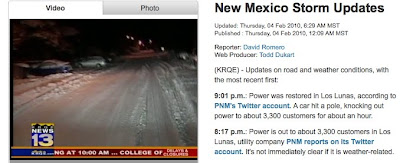
New Mexico had already been pummeled by a substantial storm on the prior Thursday and more rough weather was in the forecast. Los Alamos sits at 7,300 feet with travel up and down the mountain absolutely determined by weather.
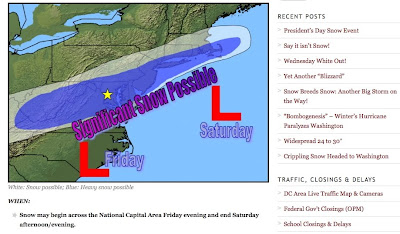

Meanwhile back in Washington, D.C., the weather was shaping up to become a record buster. The news media were coming up with disaster branding, while the airlines were shedding flights. Key presenters and participants were starting to get mired in the mess.

Fortunately, TechApplication had been retained to WebCast the event. This meant that resources and technologies were already in place to use the internet to support the Summit. Over the weekend and into Monday, phone calls flew back and forth about whether to pull the plug on the entire event or not. In the end, it was decided to go ahead with the Summit as well as the WebCast. After all, as Mary Hanson, the DHS producer, for the event put it: "What kind of message would it send if DHS canceled just because of a little inclement weather." Ok, granted it was more than a little inclement weather, it was a real record buster, but she was right and certainly had the right attitude!

We already had the capability in place to simultaneously WebCast out of Washington DC . So with two channels at our disposal, we quickly came up with a plan to WebCast our key presenters from the Vermont facility in Washington on Channel 2, capture that WebCast in Los Alamos, and then composite the whole thing and re-WebCast the results to our worldwide online audience on channel 1. Easy as pie. Only we had never actually done that before. On the other hand, if everything was handled just right, there was no reason it shouldn’t work. We got everything ready and even managed a small test window, one hour before show time. In the technology stunt world, we like to call that a white knuckle rehearsal.

FLASHBACK. Diddle Dee, Diddle Dee, Diddle Dee... Schwing - we were reminded of the following movie scene:


Darn if things didn’t get worse in Washington! Word came down that all government facilities would be shut down on Tuesday. That meant, even if our scheme was going to work perfectly, no one was going to be able to get into the Washington facility to WebCast out.

It looked to me like we were all set to punt - without a ball. “iPhones! We can use iPhones as instant phone bridges”, enthused Nik, the project’s engineer.

Hmmm. Applying iPhone Technology to solve the problem.... He was right. The iPhone is a hybrid phone and audio device.We should be able to integrated it into the WebCast. Of course, we were on a mountain, in a snowstorm, with no access to Radio Shack, Frys or Best Buy! We would only be able to use what we had on hand.
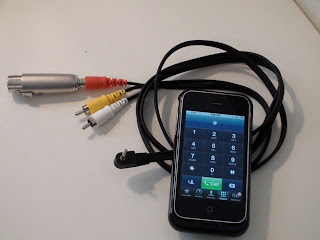
A quick rumble through the cable box brought up the ubiquitous "AV cable". Everyone with kids and a camcorder has one of these! It has an 3.5mm 4 segment male jack on one end, and red, white and yellow RCA pin jacks on the other.

The only trick is the arcane knowledge that Apple did not pin the iPhone as you would expect. Surprised? Hey this is Apple... marchers to their own tune, drummers of their own beat!


So.... The red and white RCA pin jacks are not the Left and Right audio out of the iPhone with this cable.

INFORMATION TO NOTE:
The white jacks is AUDIO OUT - Left,
The yellow jack is AUDIO OUT - Right,
While the red jack (shown with an XLR adapter) is mono AUDIO IN - which we hooked to a mixer output back into the iPhone letting the remote presenter hear the moderator.
These are all "line level" signals and compatible with pretty much anything audio.
You need to mute the phone's mic to avoid feedback once the presenter is on line.

In the blink of an eye, we were integrated into the house audio and the Newtek Tricaster we were using for the event, and before your could say “Shouldn’t we try to rehearse this?” our first phoned in presenter was live on our worldwide WebCast, with the second on standby on iPhone #2.

The only real problem we had was the 20-30 second standard WebCast delay, which the presenters had to contend with. This caused mild hassles with their instructions to advance slides, and seeing the results, as well as a delay during Q&A sections. Otherwise, it was fantastic. The audio quality was great, the interaction smooth, and the event a success.

All we needed was a commonly available cable, and knowing how to plug it in. It was a real McGuiver experience. OK. That was the last obscure media reference in this posting!

This is Theo (and Nik) applying iPhone technology to WebCasts!

Saturday, February 6, 2010

APPLYING LASERS TO VIDEO PROJECTION TECHNOLOGY

The first time I saw a laser video projector was around 1980. It was a behemoth device larger than a Smart Car, with large water hoses attached to keep it from bursting into flames. When you turned it on, the neighborhood lights would dim (slight exaggeration). Even at that, the picture itself was pretty dim. The quoted price was $350,000. The delivery time was "give us an order and we will tell you". The demo had to be restarted three times and the colors were really strange. Nevertheless, I fell in love with the concept!

You see, the basic idea of video laser projectors is to scan a laser beam in a raster pattern to make a picture. Its like old CRT televisions only it is a laser spot scanning left to right, top to bottom to make a picture. If you have ever waved around a laser pointer really fast, you'll get the basics of the idea.

This means you are creating a picture without using a lens. You are simply pointing a laser beam in a very fancy way. The result is a picture that is in focus no mater where you point the device. The image automatically wraps itself onto any curved shape. The image can instantly be any shape you want and best of all, you can whip the projection to any spot in the room and make a picture there. If the surface is close, the picture will be small and brighter. If the surface is further away, the picture will be larger and dimmer - but always in focus.

I have been imagining applications for projected images with these characteristics for decades. Unfortunately, I have never been able to implement any of them.

That first company never made it out of the gate. From then on, every 5 years another contender entered the field. For the first 20 years or so, all contenders were in the $300,000 range. Colors got better. Features were refines. Reliability always sucked. None of them ever delivered a viable product. The problem was essentially that big, bright, long running, stable and reliable laser are not an available technology. However, small, solid state, reasonably bright and reliable lasers HAVE become available.

So flash forward to seven years ago. I was cruising the dark and dingy side aisles of my favorite display technology trade show. This is a really geeky show called SID, and the side aisles are where the really good stuff is hiding. Suddenly I spotted a couple of engineers in a small 10 X 5 booth huddled around a small sugar cube with a mess of wires going in and out at odd angles... 5 inches or so from this cube was a red video picture about 4" in diagonal. It was a tiny little laser projector. It was dim, it was monochrome red, but it was also a new twist to my laser projector fantasies.

It turned out these two engineers worked for Symbol, the world's largest bar code scanner company and had convinced their boss to let them build this idea. I probably spent over an hours talking to them. When I saw them again the next year, they were in the same small booth and did not look happy. Motorola was about to buy the company and they thought their project was sure to get the ax.

They disappeared.

Two years later, the technology popped up again. This time from a larger, seemingly well funded startup. I don't know if my two little engineering buddies were a part of this or not, but I was excited and started to track MicroVision's efforts in this area.

In September, 2009 they announced that they were ready to sell and ship a pico laser projector. In January I saw them again at CES and took a look at their production unit.


The MicroVision Pico Laser Projector actually works. The colors look good. The picture (keeping it around 18" diagonal) is bright enough to be useful and crisp. And the price is $500 at retail... or will be if they actually ship.

IMAGINING APPLICATIONS
Philip has been servicing and repairing hydraulic systems on airplanes for almost 10 years. He has never had a tool like this before. Attached to his safety work glasses is a small device with two cameras. One forward looking camera sees what he sees, and one backward looking that tracks his eye so the system knows exactly what he is looking at (see: APPLYING AUGMENTED REALITY TECHNOLOGY)

Mounted on the other side of the glasses is a small pico laser projector. He glances at the smooth band on the sleeve of his new service overalls.

Instructions appear with animated diagrams of the procedure he is about to perform. He turns his focus to the complex new hydraulic assembly. He sees arrows are projected onto the assembly, highlighting the next part to address. He glances back to his sleeve and confirms the step. He wonders if the new engineers coming up using this stuff will ever really know how to use manuals and blueprints.

He makes a mental note to ask his brother-in-law, an orthopedic surgeon, whether they are now using similar technologies for operations.

His system flashes and he gets back to the job at hand.

Theo applying laser video projection technology...

Tuesday, February 2, 2010

APPLYING BIOMETRIC MONITORING TECHNOLOGIES

A boomer is a term used in Australia for a male kangaroo.

It is a also a term for a person who was born during the demographic Post-World War II baby boom. This is one of the largest demographic bubbles in history with about 78 million boomers in the US (450 million worldwide) born between 1946 and 1964.

Starting around 2016, another boomer will turn 70 years of age every 7.5 seconds - a trend that will continue for over 15 years. That is a very large market of consumers who are going to demand a variety of new technologies to make their final 30-40 years of their lives more comfortable. Yes - Most boomers will likely become centenarians.

This will spur innovation in many areas including medicine, robotics as well as biometrics. With this in mind, applying technology to an aging populations will be a running theme of this blog.

At the January CES show, in Las Vegas, a couple of different "TechZones" were dedicated to digital health and the "silver bubble". I have been tracking this trend for a number of years. What I found most significant at this year's Consumer Electronics Show was the entry of some "Big Boys" into the game - especially in the area of biometric monitoring.

Most notable to me, was Qualcom, the communications giant, hosting a number of biometric monitoring solutions in their booth, including a company called MedApp.


This is just the nascent tip of the iceberg. The combination of bio-sensors including wearable devices, Bluetooth, wireless data transmission, and a new world of services will form the foundation for applying biometric monitoring technologies.

Of course the military are also ALL OVER THIS, for monitoring soldiers in the field.

IMAGINING APPLICATIONS
The team from Firehouse 19 arrived a mere 12 minutes after the call came in.

The building was smoking heavily and flames were shooting out of a 4th floor window. This was not just a regular residential building but a Senior Living Facility.

Johnson was the team's Information Specialist. His portable command center was up and operating almost before they parked. He quickly scanned for medical data signatures. Bingo! They were on the Qualcom Healthnet. His HIPAA override request needed to be approved by the cyber-judge on duty. "Damn the bureaucrats" he muttered as he lost precious minutes to override the medical privacy requirements that would allow him access to the biometrics of the facility's patients.

Moments later, he was cleared to intercept the biometric stream. "We've got three bogeys on the 4th floor who did not get out", he spoke calmly into the headset mic. "Pulse elevated, breathing shallow for two of them, and very low O2 for all. I am sending locations and names now! " he transmitted.

He scanned the rest of the building. If there were others, they were not wearing bio monitors.

He switched over to his own ResponderOne biometric net. After all, keeping an eye on his fighters was the real reason he had a job. The new sensor embedded undergarments they now wore were genuinely amazing. They not only measured pulse, temp, BP and all the other regular stuff, but they also wicked off the perspiration from the firemen and ran real time diagnostics on the fluids.

He watched the display as his fighters reached the victims on the 4th floor. They were going to be OK!. A red dot started pulsing. "Calm down, Mendoza!" he cautioned a young Latina rookie over the radio, "Your BP is WAY up there. Turn up your O2 and slow down!"

"Roger!", came the reply.

"OK. Williams, your salt level is way down. Sip some gator."
"Bite me. Johnson", the scruffy vet came back. "You just sit back in your comfy little truck and let the real men get on with fighting this fire!". Johnson sighed, and noted that Williams was sipping the electrolyte water. It was going to be a long night.

Theo, monitoring how to apply biometric monitoring technology!